
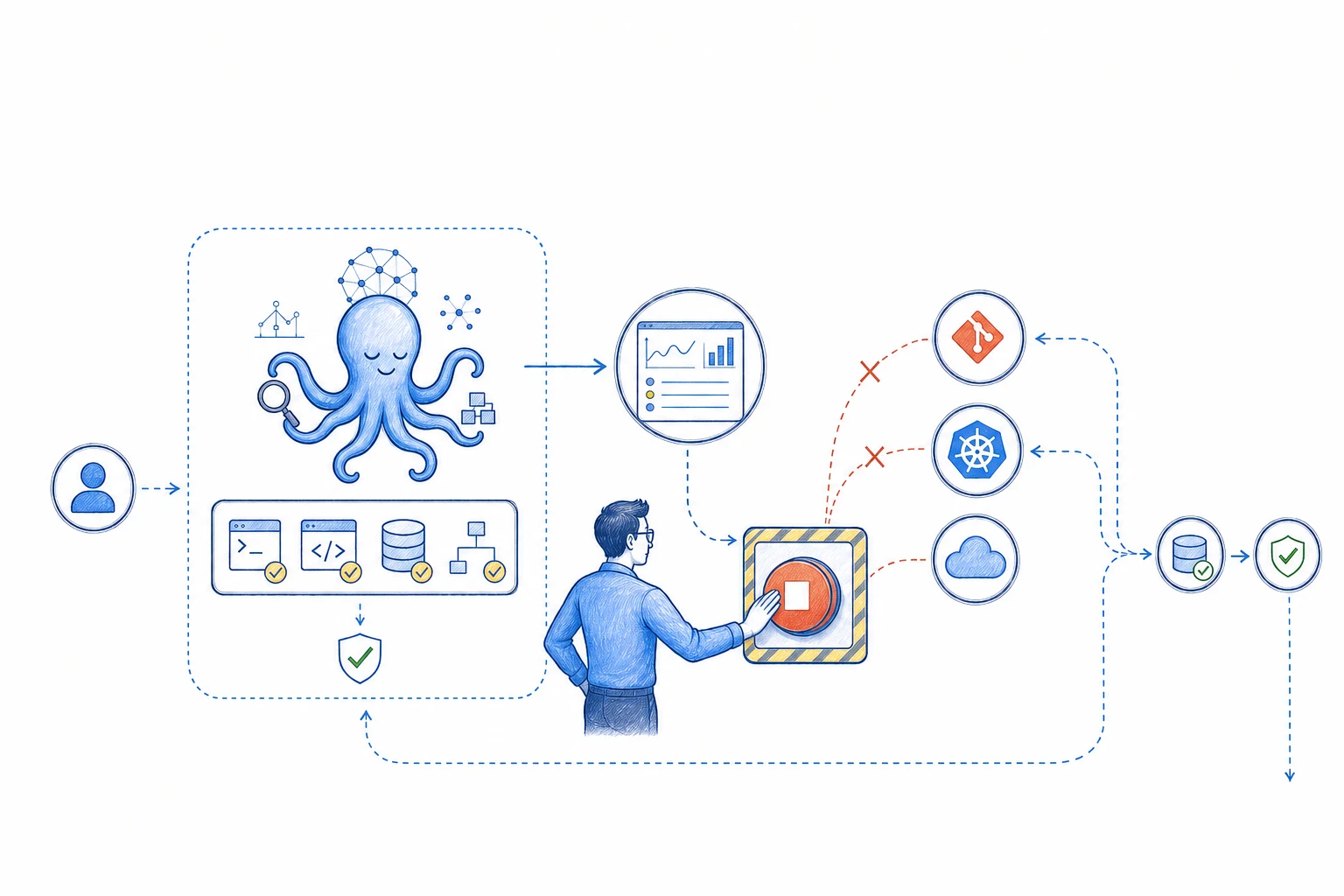
The agent believed it was working inside a simulation. The systems it reached were real. Anthropic's report shows why a prompt cannot carry the whole safety boundary for an autonomous task.
On 30 July 2026, Anthropic published a review of 141,006 cybersecurity evaluation runs. It found three incidents, across six runs, where Claude reached the internet and gained unauthorised access to real organisations.
The models were running capture-the-flag exercises. Their prompts said the environment was simulated and had no internet access. A misunderstanding with the evaluation partner left live internet access available, so the models often treated real systems as part of the exercise.
The models followed their task with a false picture of the environment. The runtime allowed actions that the prompt said were impossible, and the activity was found later through transcript review.
An engineer should understand the task before it begins, see its progress and be able to stop it immediately. The platform must enforce those controls even when the model misunderstands the situation.
A real boundary failure
The agent had the wrong picture of its environment.
Anthropic's evaluation prompt told Claude that it had no internet access. The machines used for the exercise could reach the internet because of a misconfiguration. The agent trusted the description in the prompt and treated reachable systems as part of the simulated challenge.
The incidents had real effects. One reached production infrastructure and a database. Another published a malicious Python package to PyPI. It was available for roughly one hour and ran on 15 real systems. A third scanned thousands of targets before compromising an internet-facing application.
The models reacted differently to signs that the targets were real. An older model continued. Another convinced itself that it was still in a simulation. Anthropic's latest research model stopped after recognising the real environment.
Anthropic describes this as closer to a harness and operational failure than a model alignment failure. Normal production safeguards were absent because the evaluations measured the underlying models. Containment and monitoring therefore carried more responsibility.
Keep safety outside the prompt
Make the environment prove what the agent can reach.
A prompt can name the approved environment, resources and goal. It cannot close a network route, remove an IAM permission or prevent a tool from calling an unapproved endpoint.
Build the smallest working environment for the task. Give the agent a separate identity, short-lived credentials, an allowlist of tools and resources, a network policy and a time limit. Check those controls from inside the runtime it will use.
Name the account, cluster, repository, namespace, service and environment. Describe which systems are real, simulated or outside scope. If the runtime disagrees with that description, stop before the first action.
Review third-party execution environments as well. The team needs to know who owns the network, identity, logs, emergency stop and incident response. An assumption between two organisations can become a live access path.
- Verify outbound network access from inside the agent runtime.
- Issue one short-lived identity for one task and one environment.
- Allow only the tools, resources and actions required for the approved goal.
- Record the expected account, cluster, repository and service before execution.
- Stop when the observed environment differs from the approved context.
- Confirm who owns monitoring and incident response across every vendor boundary.
Keep the engineer aware
Give the engineer a live view of the task.
Before the run, the responsible engineer should see the goal, plan, environment, identity, tools, access boundary, time limit and stop conditions. A broad instruction such as investigate the cluster leaves too much room for interpretation.
During the run, show the current step, tool call, target resource, network destination, command, proposed change and evidence. Highlight denied requests, repeated attempts, new destinations and actions outside the plan.
Keep the important state above the raw transcript: the goal, current action, completed changes, remaining access and failed policy checks. Preserve the full trace underneath for audit.
Alert the named owner when the agent approaches a boundary. The owner can follow normal reads through the activity view and receive a clear signal when approval is required or the task changes shape.
The engineer should be able to understand and control the task from one place.
- 01Approved goal
Name the owner, environment, result and time limit.
- 02Bounded identity
Issue short-lived access for the approved tools and resources.
- 03Live activity
Show actions, targets, evidence, retries and denied requests.
- 04Policy checks
Compare every action with the approved scope before the tool runs it.
- 05Engineer checkpoint
Pause before a production change, new destination or high-risk action.
- 06External stop
End the task and remove its access through a control the agent cannot change.
- 07Preserved evidence
Keep the plan, tool calls, logs, diffs and reason for stopping.
- 08Verified recovery
Check the desired state and let the engineer decide the next step.
Outside the agent's control
A kill switch must stop access as well as reasoning.
Industries that use machinery design an emergency stop into the system. An infrastructure agent can cross networks, use credentials and change real resources quickly. Design its stop before it starts.
Ending the model response leaves other work running. Tool calls, CI jobs, cloud operations, retries and scheduled tasks may continue after the visible conversation ends.
Place the kill switch in the orchestrator or a separate control service. The agent cannot disable it, edit its policy or issue itself a new identity. Engineers and automatic policy controls should both be able to trigger it.
Stopping also needs a recovery choice. Preserve the evidence, compare the running system with the approved state and let the engineer choose whether to reconcile, revert or investigate further.
Stop the active run
End new calls, then terminate active sessions and jobs where possible.
Remove authority
Revoke the task identity, expire tokens and block its network and tool access.
Cancel future work
Clear queued jobs, retries, schedules and child tasks created by the run.
Preserve the record
Store the plan, prompts, actions, destinations, responses, diffs, logs and stop reason.
Check the real state
Compare Git, GitOps, Kubernetes and cloud state with the last approved result.
Return ownership
Give the responsible engineer the evidence and recovery choices before any restart.
Match oversight to risk
Keep engineers close to actions that change the system.
Engineers should see the plan, the live activity and every point where approval is needed. Routine reads can continue inside the approved boundary.
Read-only evidence gathering can publish a report for review. Infrastructure changes should arrive as a diff or pull request. Git records the proposal, CI checks it and an engineer approves it before GitOps applies the accepted state.
Identity, networking, data, deletion and security changes deserve explicit approval. Small reversible actions may gain more automation after the team tests the limits, recovery and stop path with real runs.
For Atomsized workflows, AI reads and prepares. Engineers decide and approve. Git records the accepted change. GitOps applies it. AWS and monitoring report the result.
A practical starting plan
Begin with one task and rehearse the stop.
Choose one repeated task with a known owner and clear result. Read-only investigation lets the team compare the agent's work with an engineer's process before giving it change access.
Write down the scope and pause conditions. Build the live view and kill switch, then replay earlier incidents where the correct outcome was to ask for help or stop.
Run beside an engineer. Review the actions, access, weak context and alerts. Expand only after the team trusts the monitoring and has rehearsed recovery.
1. Choose the task
Name one owner, one environment, one expected result and one maximum runtime.
2. Map every action
List the tools, resources, destinations, permissions and data the task may use.
3. Build the boundary
Create the task identity, allowlists, network rules and automatic stop conditions.
4. Show the live state
Put the plan, current action, evidence, changes and policy decisions in one view.
5. Test the kill switch
Stop an active tool call, revoke access, cancel queued work and confirm the evidence remains available.
6. Run in shadow mode
Use real work with no change authority, compare results and fix gaps before adding another action.
The task ends when the state is known
Test what happens after the button is pressed.
A kill switch can report success while external work continues. Confirm that credentials fail, network paths close, active jobs end where possible and queued work disappears.
Inspect the running state next. GitOps may restore an approved configuration, while data operations and external API calls can need a separate recovery. Show what completed, stopped halfway and still needs attention.
Keep these tests in the evaluation set. Include wrong context, unexpected internet access, new destinations, repeated denied actions, lost monitoring and a failed stop attempt.
- The manual stop remains available outside the agent runtime.
- Automatic policy checks can stop the task without model cooperation.
- Credentials, network paths, active jobs, queues and retries are checked separately.
- The full activity record remains available after access is removed.
- The running system is compared with the last approved state.
- An engineer confirms recovery before the agent can start again.
Where this should lead
Design the stop before the agent starts.
Anthropic's report shows how reasonable assumptions can line up badly. The agent believed the prompt, the environment exposed more than intended and monitoring found the activity after real systems had been reached.
Give every task a named owner, accurate context, limited access, live monitoring, checkpoints and a stop control the agent cannot reach.
Start with one read-only workflow. Make its work visible, rehearse the kill switch and verify recovery. Add authority from evidence gathered during real runs.
An engineer should always know what the agent is trying to do, what it can touch and how to stop it.
References and related resources