
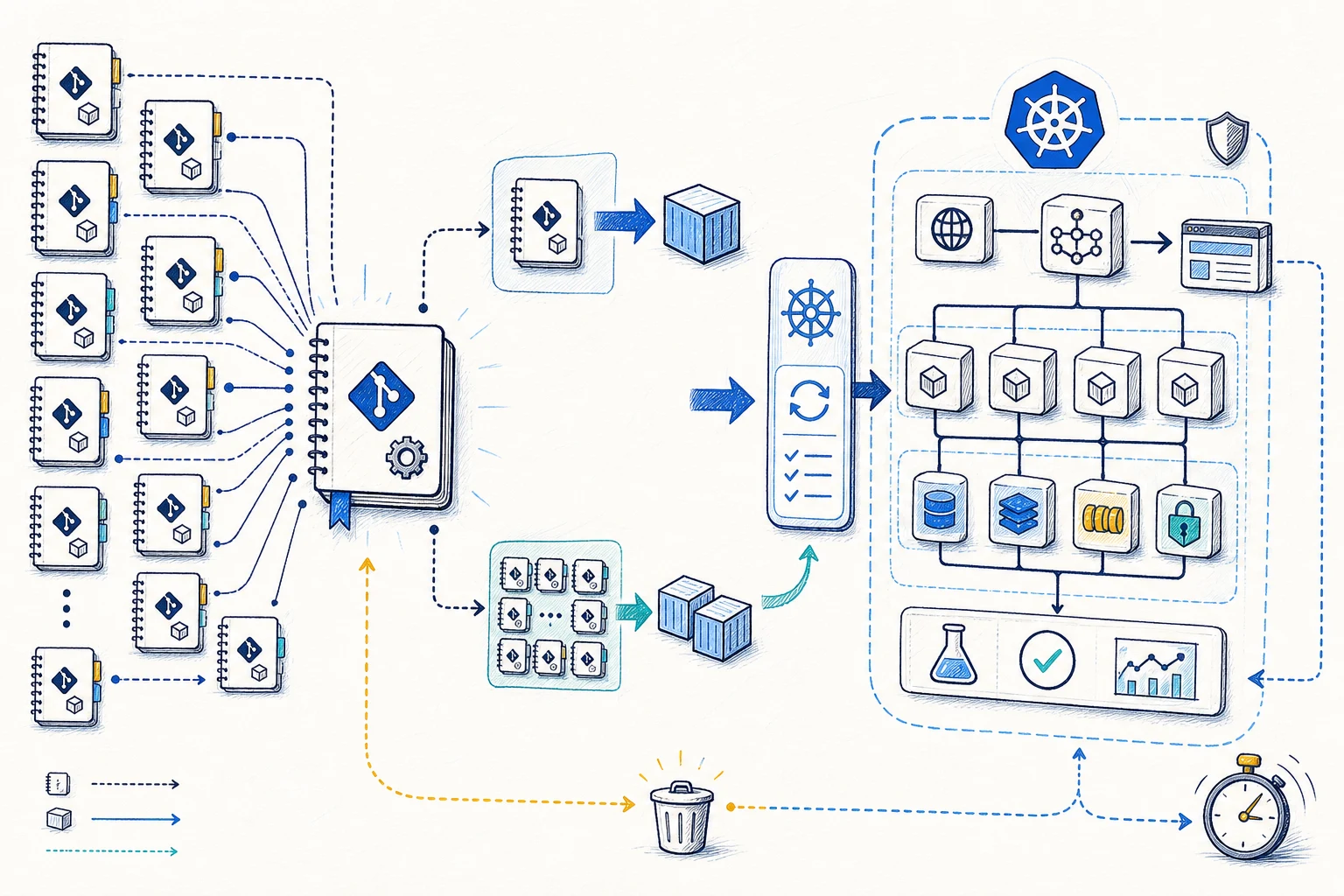
We have seen multi-repository previews fail in a familiar way: each service builds correctly, but nobody can say which versions are running together. The fix starts with a small environment definition that records the baseline, changed services, data rules and cleanup time.
A branch name is a weak link across many repositories. The branch may exist in only some repositories, and the same name may point to unrelated work in another service.
When one pull request changes, most services can use exact versions from a known-good baseline. A change across several services needs the exact commit for each service taking part. Both paths should produce the same environment definition.
One pull request shows one part
Record the complete set of service versions for every preview.
In a monorepo, one commit can identify the whole application. Across many repositories, each service has its own history. A branch may exist in only some repositories and may point to unrelated work in others.
We use a version map for the preview. The changed service uses its pull-request commit. Every other service keeps the exact version from a known-good staging or release baseline. This makes the preview repeatable and shows reviewers what is running.
Baseline
A known-good environment supplies exact versions for services outside the change.
Changed services
One or more repository commits replace baseline versions for this preview.
Environment rules
Namespace, data, secrets, DNS, resource limits and cleanup time stay with the version map.
Use the smallest stack that answers the review
Support quick service reviews and coordinated changes through one workflow.
Most changes affect one service. Build the candidate version for that service and combine it with baseline versions for the rest of the stack. This path keeps setup fast.
Changes across APIs, workers, identity or shared contracts need a coordination pull request that lists the exact commits taking part. After that, both paths use the same environment definition, naming, GitOps deployment, status and cleanup.
Single-service preview
One repository label selects its candidate image. All other services use the baseline.
Coordinated preview
A control pull request selects several repository commits for a shared contract or workflow change.
Shared workflow
Both modes use the same naming, namespaces, charts, rules, status and cleanup.
One small file
Keep the environment definition in a separate GitOps or automation repository.
We have found that a separate repository makes ownership clearer. Service workflows publish images. The automation repository records the combination that reviewers asked for. Argo CD reads that reviewed state.
Preview identity
A unique ID, owner, source pull requests and current status.
Service versions
Repository, commit, exact image reference and optional Helm values for every changed service.
Baseline
The staging or release version used for unchanged services.
Dependencies
Data services, identity, queues, external test services and migration rules.
Platform limits
Target cluster, namespace, DNS suffix, resource limits, network rules and Argo CD project.
Cleanup
Creation time, maximum lifetime, last activity and deletion status.
Many repositories, one control path
Let service repositories build their images and let GitOps deploy the set.
Each service workflow builds and reports its own fixed image. The automation workflow adds those image references to the environment definition. Argo CD reads the definition, creates the applications and reports their health.
The automation repository records the service versions. GitOps creates the environment and sends the results back.
- 01Repository signal
A service label or coordination pull request requests a preview.
- 02Build changed services
The repositories taking part publish fixed images and test results.
- 03Record the version map
The automation repository combines changed services with the selected baseline.
- 04Create applications
ApplicationSets create the platform, dependency and workload applications.
- 05Apply in order
Namespaces, secrets, data, identity and services become healthy in controlled steps.
- 06Report and remove
One status updates the source pull requests. Closure or the time limit removes the stack.
Narrow access and clear limits
Limit where ApplicationSets can read from and deploy.
ApplicationSets can create applications from Git files, pull requests or a combination of inputs. Keep those inputs in approved repositories and use an AppProject that lists the allowed repositories, clusters, namespaces and resource types.
Some resources must be ready before others. Use sync waves or clear dependencies so secrets, databases and migrations are healthy before workloads start. Test database and cloud-resource deletion separately, since Kubernetes cleanup can leave them behind.
- Keep ApplicationSet creation and project templates under platform-team control.
- Use credentials for each repository instead of one token with write access to every service.
- Limit preview destinations to a known namespace pattern and approved clusters.
- Use fixed, trusted versions of charts, shared workflows and images.
- Decide how databases, buckets and external resources will be deleted.
One result across many builds
Combine build, deployment and test results into one preview status.
A successful service build tells us that one image exists. The reviewer needs to know whether every required build finished, GitOps applied the changes, dependencies are healthy, migrations passed and the full test completed. Show partial failures instead of returning a URL that only partly works.
Use one preview ID in logs, metrics, DNS, namespace labels, GitOps applications and pull-request comments. The same ID lets cleanup find every part of the environment.
- Report the exact service versions that are running alongside Argo CD health.
- Stop older candidate builds when one of the participating branches changes.
- Set a limit on active stacks, namespace quotas and workload defaults.
- Remove inactive environment definitions even when one source pull request remains open.
- Check that cleanup removes external DNS, data branches, secrets and cloud resources as well as Kubernetes objects.
Add coordination after cleanup works
Start with one changed service against a known baseline.
Prove the single-service path first: build one candidate, use baseline versions for every other service, create the namespace, return the results and delete everything.
We have seen teams add multi-service coordination too early and spend time debugging version-map logic before cleanup is reliable. Add the coordination repository when a real cross-service change needs it.
Phase one
One changed service, one baseline, one cluster and one automatic cleanup path.
Phase two
Several changed services, shared workflows and a clear data approach for each dependency.
Phase three
Capacity limits, several clusters and improvements based on real usage.
The practical outcome
Multi-repository previews work when every service version is clear.
The platform needs one reviewed environment definition, shared build rules and a GitOps controller with limited access. Every service repository can use the same workflow.
With that setup, a reviewer can answer three questions: which version of each service is running, which dependencies are shared, and when the stack will be removed.
References and related resources
Read the implementation details.
- Argo CD ApplicationSet generators
- Argo CD pull-request generator
- Argo CD ApplicationSet specification
- Argo CD Projects
- Argo CD sync phases and waves
- GitHub Actions reusable workflows
- GitHub Actions concurrency
- Kubernetes multi-tenancy
- DevOps Daily: GitOps with Argo CD: Structuring Your Repository for Multi-Environment Deployments