
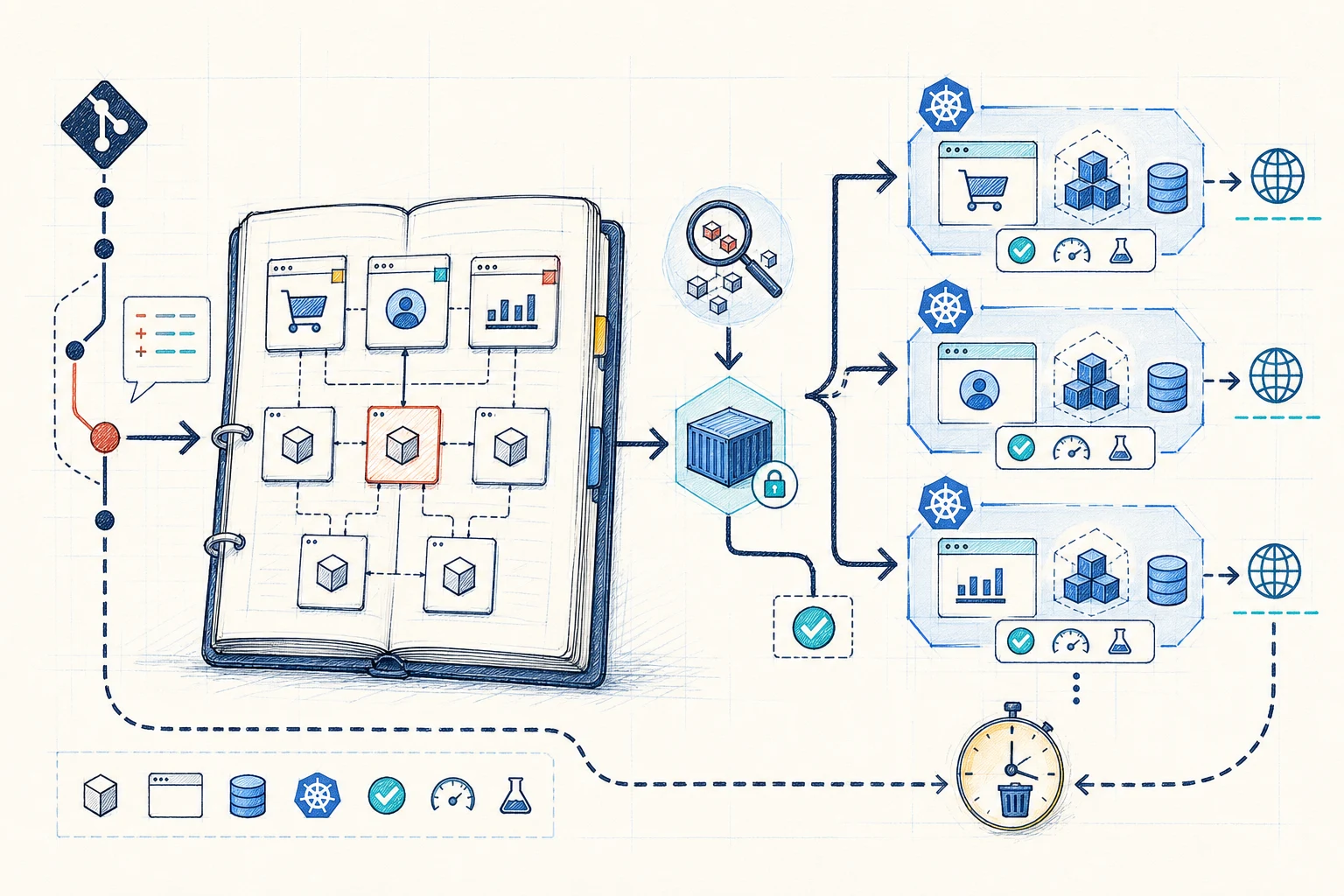
A shared development environment works until several changes need it at once. We have seen reviewers wait for a free slot, changes overwrite each other and old environments stay alive because nobody knew who owned them. A preview environment gives each pull request a short-lived place to review the change.
A monorepo gives us one useful starting point: a single commit can identify the full source state. This makes it easier to work out what belongs in a preview.
The harder questions come next. Which parts need rebuilding? Which data and dependencies need their own copy? What happens to migrations? Who removes the environment when the pull request closes?
We aim for the smallest environment that can answer a real review question. A UI review may need a web application and shared test services. A migration review may need its own database and a longer setup.
The point where sharing slows down
The problem starts when several changes need one environment.
We usually notice the problem through waiting. One change is ready for product review, another needs QA, and a third includes a migration. The shared environment can show only one useful state at a time.
Team size is a rough signal. A team of five that releases often can hit this problem earlier than a larger team with fewer shared changes. Measure the wait and repeated review work before deciding what to build.
Deployments overwrite each other
One change replaces the version that somebody else is still testing.
Shared changes reach further
A small UI change can depend on a library, API contract or migration elsewhere in the repository.
Slow feedback loses context
Reviewers wait for a stable slot, and the author has to return to work they completed earlier.
Build only what the change affects
Use the dependency graph to decide what needs to build.
Path filters can stop runs for unrelated changes. They cannot show the full impact when a shared library, generated client or schema changes.
Use the monorepo dependency graph and a known base commit to find the build, test and deployment targets affected by the change. Build each image once from the pull-request commit and use the same fixed reference throughout the review.
Start
Use pull-request paths or a label to decide whether the preview should run.
Work out the impact
Find changed packages and their dependants from the repository graph.
Build once
Publish fixed images and pass their exact references into the environment setup.
Keep the rules small and clear
Give every preview the same basic rules.
We have found that naming and ownership need to be decided early. If each team invents its own namespace, URL, secret handling and data setup, cleanup becomes unreliable.
Identity
A stable preview ID based on the pull request, with safe names for Kubernetes and DNS.
Source
The commit SHA and exact image reference for every changed application component.
Boundary
A namespace, URLs, resource limits, network rules and approved secret references.
Data
A named database approach, migration step and approved source of test data.
Results
Deployment health, smoke tests and a link posted back to the pull request.
Cleanup
An owner, last activity time, maximum lifetime and repeatable deletion process.
One commit to one preview
Build the application first, then let GitOps create the environment.
CI finds the affected components, runs tests and builds the images. Git records the environment setup. Argo CD applies it and reports health. We keep these jobs separate because failed steps are easier to retry and cleanup can follow the same recorded state.
The pull request stays where the reviewer makes the decision. The environment follows a recorded setup and can be removed safely.
- 01Pull request signal
A label or policy marks the change ready for an environment.
- 02Find affected packages
The workflow finds changed packages and the parts that depend on them.
- 03Build fixed versions
Images and static files are published with references tied to the commit.
- 04Record preview setup
Git records the namespace, images, values, data rules and cleanup time.
- 05Apply with GitOps
Argo CD applies dependencies in order and reports health.
- 06Return results and clean up
Tests update the pull request. Closure or the time limit removes the setup.
Useful test data without production risk
Choose a clear approach for each dependency.
Application containers may be cheap to copy. Databases, identity providers and paid external services often cost more and take longer to prepare. Decide which dependencies get their own copy, which are shared and which are replaced by a test service.
Use generated test data, approved copies with sensitive fields removed, temporary databases or a controlled shared test service. Make any limits clear to the reviewer.
Database
Use a database, schema or branch for each preview when migrations and saved state are part of the review.
Identity and secrets
Load approved values from a secret manager into the namespace. Keep secret values out of Git.
External services
Use sandboxes, test replacements or named shared services, and show their limits to reviewers.
Clear ownership
Keep build, deployment and approval responsibilities clear.
CI knows the source change. It can find affected components, run tests and publish images. Give CI the build role and keep its cluster access narrow or remove it.
An Argo CD ApplicationSet can find eligible pull requests directly. Another option is for CI to write a small preview definition to a GitOps repository. We prefer the written definition when data rules, cleanup time or several values need review.
- Use a dedicated Argo CD project with an approved list of source repositories, namespaces and resource types.
- Create namespaces, secrets, data services, migrations and workloads in a safe order based on health checks or sync waves.
- Post the URL, version, health and test results back to the pull request.
- Keep the production release path separate from preview deployment.
Limits from the first day
Set limits and cleanup rules before previews grow.
Set a limit on active previews, namespace quotas and default CPU and memory requests from the start. Reuse the current cluster where it is safe, and scale application workloads down when no review is happening.
- Stop older builds for the same pull request and deploy only the latest accepted version.
- Set CPU, memory, object-count and storage limits for each preview namespace.
- Use maximum age and inactivity rules in case the pull-request closure event is missed.
- Make cleanup safe to repeat and remove DNS, data, secrets and cloud resources as well as workloads.
- Show the number, age, owner and estimated resource use of active previews to the team.
Start with the review bottleneck
Prove one complete workflow before adding more.
Start with the application path that waits for review most often. Build creation, updates, health checks and deletion before adding every dependency or every pull request.
In our experience, automatic deletion deserves the same attention as creation. Test databases, DNS records and cloud resources can remain after the namespace is gone.
First
Create one namespace, one URL, fixed images, a smoke test and automatic cleanup.
Then
Add migrations, useful test data and separate dependencies where they improve a real review.
Finally
Measure waiting time, failed environments, old environments and cost before raising the limit.
The practical outcome
A good monorepo preview lets people review changes without waiting for a shared slot.
The monorepo gives us one source revision. The platform still has to handle packages, dependencies, test data, access, results and cleanup. When those rules are clear, each pull request gets a repeatable review environment.
For teams working on several changes at once, this means less waiting, faster feedback and a clearer path to release approval.
References and related resources