
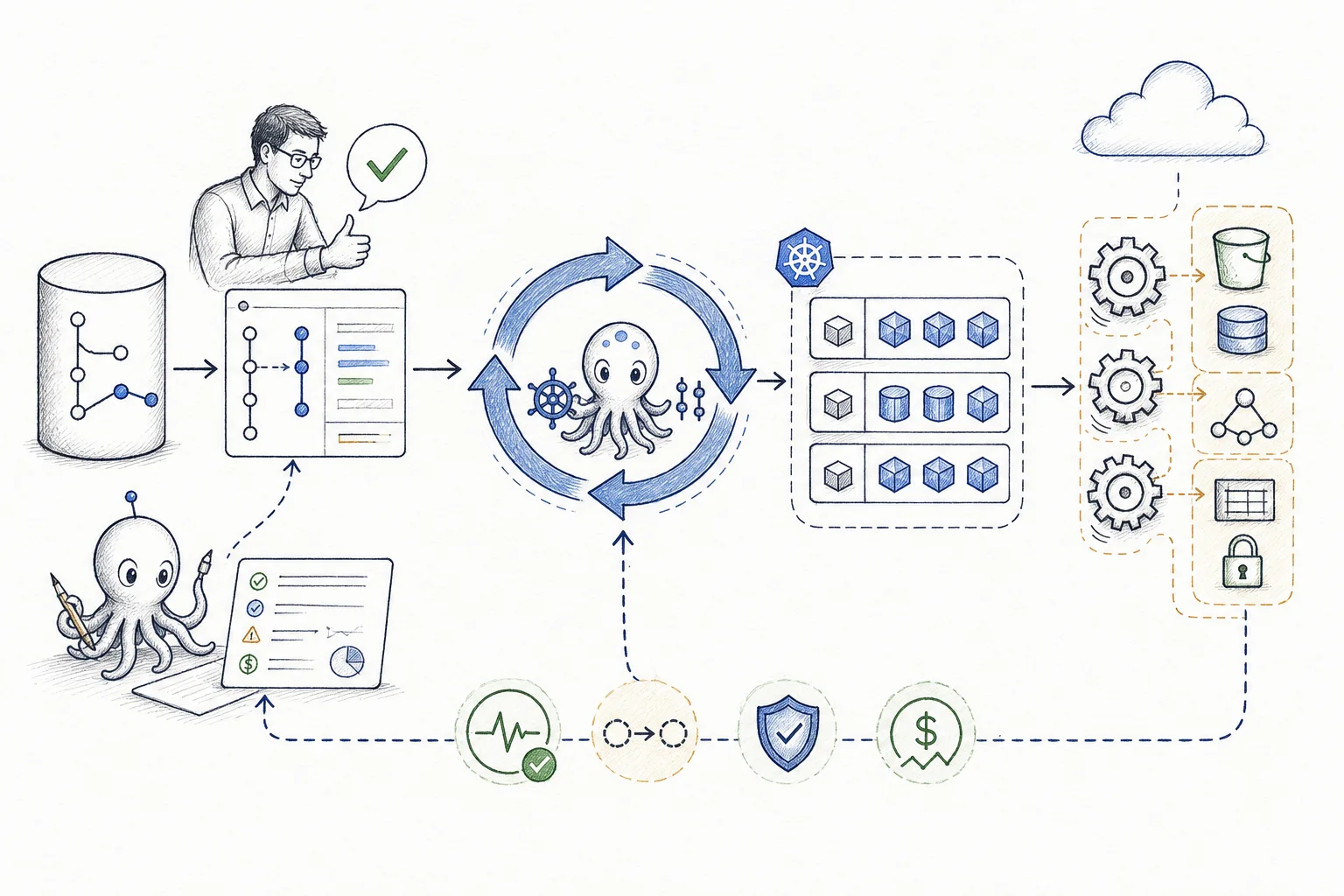
GitOps sounds simple: Git stores the desired state and a controller keeps the running system in line with it. We have seen teams understand that sentence and still struggle to answer what happens when two controllers disagree, a sync deletes data or the application looks green but is broken.
The explanation gets easier when we show the full workflow: proposal, approval, permissions, reconciliation, health checks and recovery. Every step needs an owner.
A useful mental model
GitOps is a loop from a proposed change to a checked result.
A change is prepared and reviewed. Git records what the team accepted. A controller applies that state. The platform then reports health, drift and test results before the next decision.
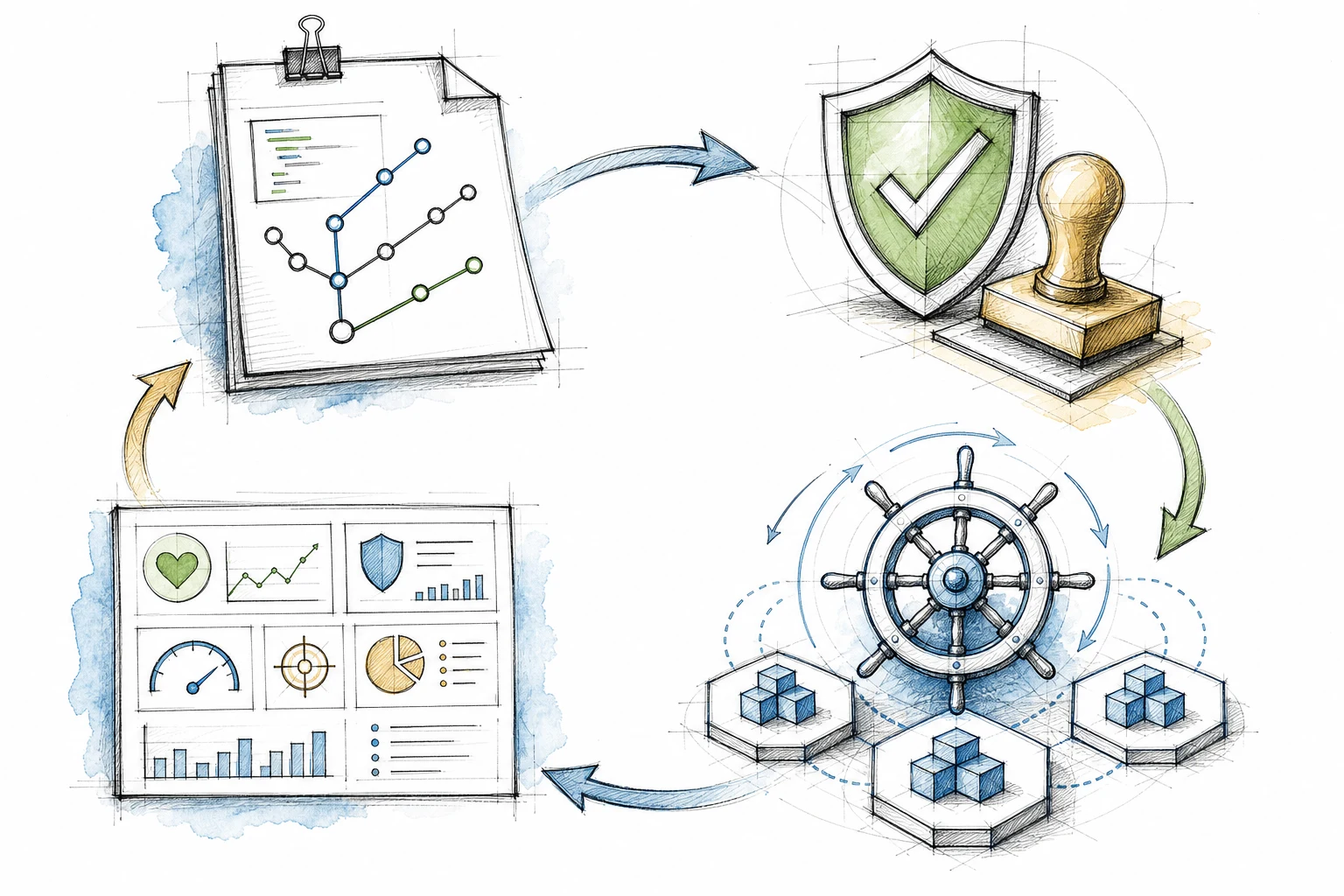
A change moves through review and application. Health and test results return before the next change.
Where explanations fail
Most diagrams hide the decisions that matter during a failure.
Four common gaps make GitOps harder to understand:
01Tool and operating rules
Argo CD handles reconciliation. Teams still choose repository ownership, promotion rules, permissions and the meaning of healthy.
02Git state and permissions
Git records the accepted state. Branch protection, review rules, CI policy, RBAC and IAM decide who can turn it into a real change.
03Several controllers
Kubernetes, Argo CD, cloud controllers, autoscalers and application operators all run their own loops at different times.
04Sync and outcome
A green sync shows that declared objects were applied. Runtime health, security, performance, cost and user checks show whether the change worked.
Once these gaps are visible, the team can decide where state belongs, which controller owns it, what access it receives and which checks show that the result is ready.
Managed controllers on EKS
EKS Managed Capabilities can run controllers while your team keeps the platform rules.
Amazon EKS Managed Capabilities provides managed Argo CD, AWS Controllers for Kubernetes (ACK) and kro. AWS runs these controller components outside the worker nodes. Their resources remain visible through Kubernetes APIs.
Managed Argo CD
AWS runs and maintains the Argo CD service. Your team still defines sources, Projects, target clusters, access and sync policy.
Managed ACK
ACK resources can represent selected AWS services through the Kubernetes API. Its IAM role should allow only the services and resources it needs to manage.
Managed kro
kro can group Kubernetes and ACK resources behind a smaller platform API. Use it when a repeated pattern benefits from shared defaults and one versioned interface.
This removes much of the controller maintenance. IAM capability roles, Kubernetes RBAC, repositories, target clusters, sync behaviour, logs and recovery paths still need clear owners and tested rules.
One reviewable flow
Keep one path from a proposed change to a checked result.
AI can organise operational context and prepare a change before review. It can also summarise health, drift, security and cost results after reconciliation. Engineers make the production decision, Git records what they approved and each controller receives only the access it needs.
AWS and EKS example
A reviewed GitOps path for EKS and AWS services.
We use this pattern to explain ownership. Each controller has a narrow job, and the team adds only the components required by the workload.
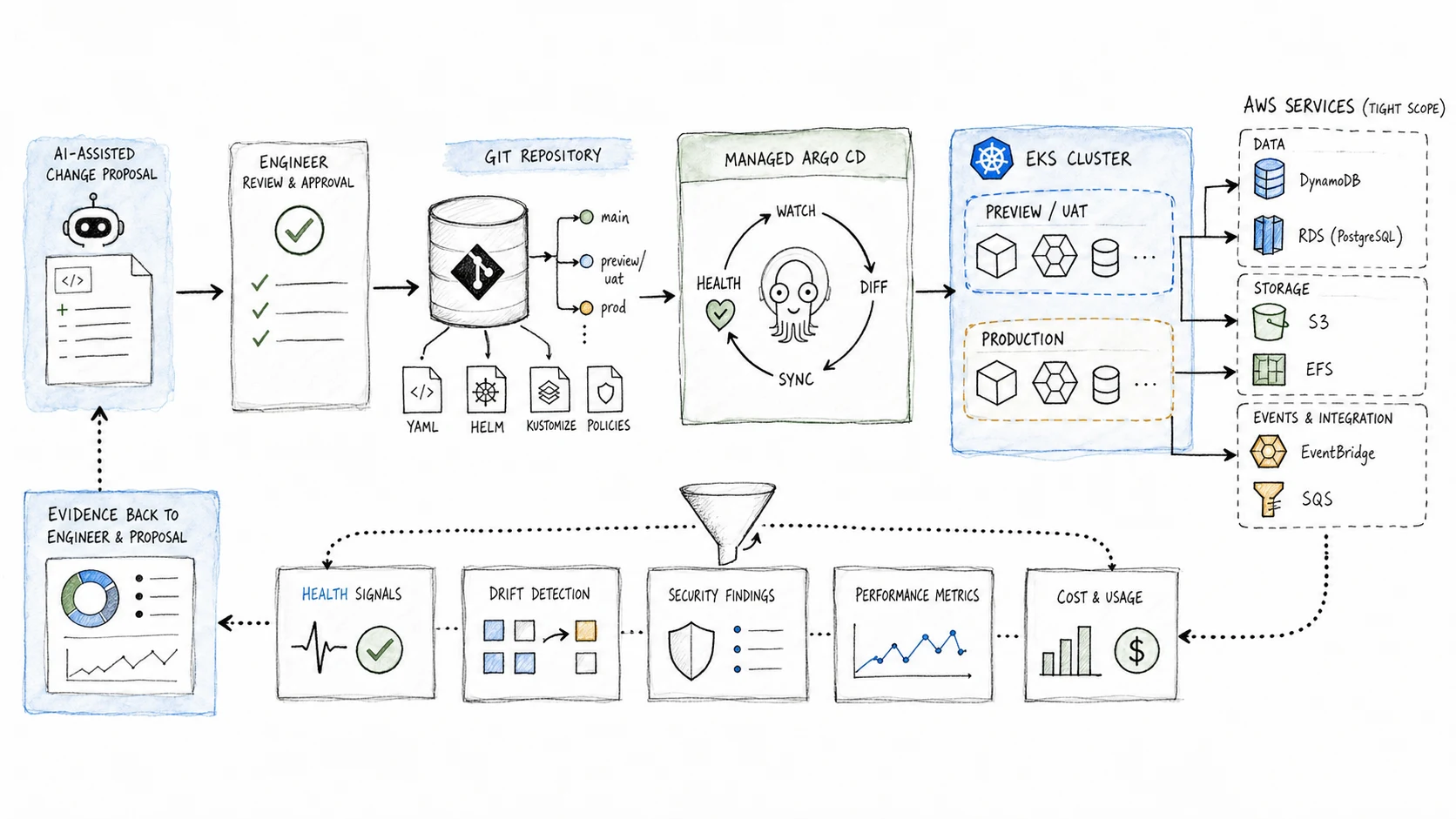
One recorded path from proposal to result, with a narrow job for every controller.
- 01Propose
AI can organise context and prepare a diff. Approval stays with engineers.
- 02Approve
Engineers review the change, test results, permissions, risk and recovery path.
- 03Apply
Git records the decision and Argo CD applies the defined scope.
- 04Run
EKS workloads and selected AWS services stay inside clear account limits.
- 05Check
Operational results return to the team and inform the next reviewed change.
Choose controller ownership
Give each kind of state one clear owner.
We have seen problems when Terraform, ACK and console changes all manage the same resource. Decide which system owns each kind of state and keep the other controllers away from it.
Foundation state
Keep account, network, identity, cluster and capability setup in infrastructure as code with a clear owner.
Application deployment
Use Argo CD Applications and ApplicationSets to apply reviewed Git state across environments.
Selected AWS resources
Use ACK for workload-owned AWS resources that benefit from the same Kubernetes workflow, with limited IAM permissions.
Platform building blocks
Use kro when a repeated group of Kubernetes and ACK resources deserves a smaller platform API with shared defaults.
Operational context
Let AI organise controller logs, health, drift, tests, security findings and cost data into a proposal. Engineers approve production changes.
Controls that build trust
Design deletion, failure and recovery before increasing automation.
Teams trust GitOps sooner when they know what happens during a failed sync, a bad change or a deletion.
- Git records the accepted state, and engineers approve production changes.
- Repository access, cluster RBAC and capability IAM roles stay separate and use the minimum access needed.
- Each environment has its own sync policy. Production can keep manual promotion, sync windows and stronger checks.
- Preview and UAT environments check behaviour before production review.
- Pruning, deletion, resource adoption and recovery are tested before automation grows.
- Controller health and logs go to monitoring systems the team already owns.
Argo CD supports automated sync, pruning and self-healing. Each setting is a policy choice. Test environments may sync continuously, while production uses an explicit promotion and sync window. Choose the setup the team can explain, monitor and recover.
How to roll it out
Increase controller access one step at a time.
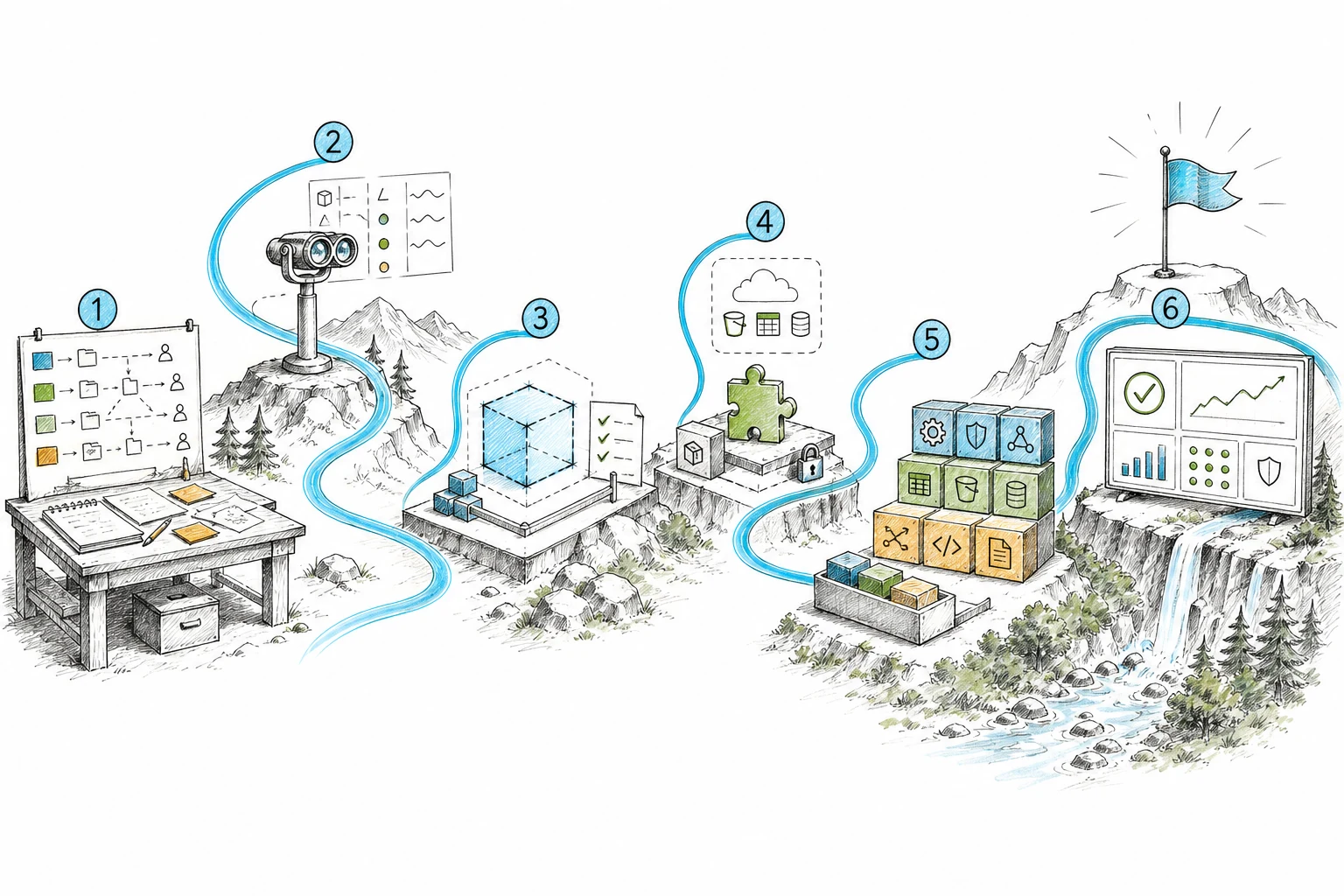
Start by making the loop visible. Increase its access after the team understands ownership, recovery and the results it reports.
- 01
Map
Record repositories, owners, environments, approval points and the current release path before choosing controllers.
- 02
Observe
Start with drift detection and health reporting so the team can see the loop without changing production.
- 03
Apply in a test environment
Automate one low-risk service or preview environment, including cleanup and failure handling.
- 04
Add selected AWS resources
Introduce ACK for resources with a clear owner, permission limit and deletion rule.
- 05
Add a platform API
Use kro when a repeated group of resources needs a smaller, versioned API.
- 06
Expand production access
Increase production automation after the team has tested results, recovery and permissions.
This gives the team time to learn normal controller behaviour and failure messages before production access grows. Repositories, permissions, logs and recovery are already familiar when the next step begins.
What success looks like
GitOps becomes easier to trust when five answers are clear.
GitOps connects proposed changes, review, deployment, drift correction and operational results. EKS Managed Capabilities can reduce controller maintenance. Argo CD applies application state, ACK can manage selected AWS resources and kro can provide a smaller API for repeated resource groups.
The implementation works when engineers can answer five questions without opening a diagram: who proposes, who approves, what reconciles, what access it has and how the team knows the result worked.
References and related resources
Read the implementation details.
- Amazon EKS: Continuous Deployment with Argo CD
- Amazon EKS: Working with capability resources
- Amazon EKS: Deploy AWS resources with ACK
- Amazon EKS: Resource composition with kro
- Amazon EKS: Security considerations for capabilities
- Argo CD: Automated sync policy
- DevOps Daily: Introduction to ArgoCD: Getting Started with GitOps