
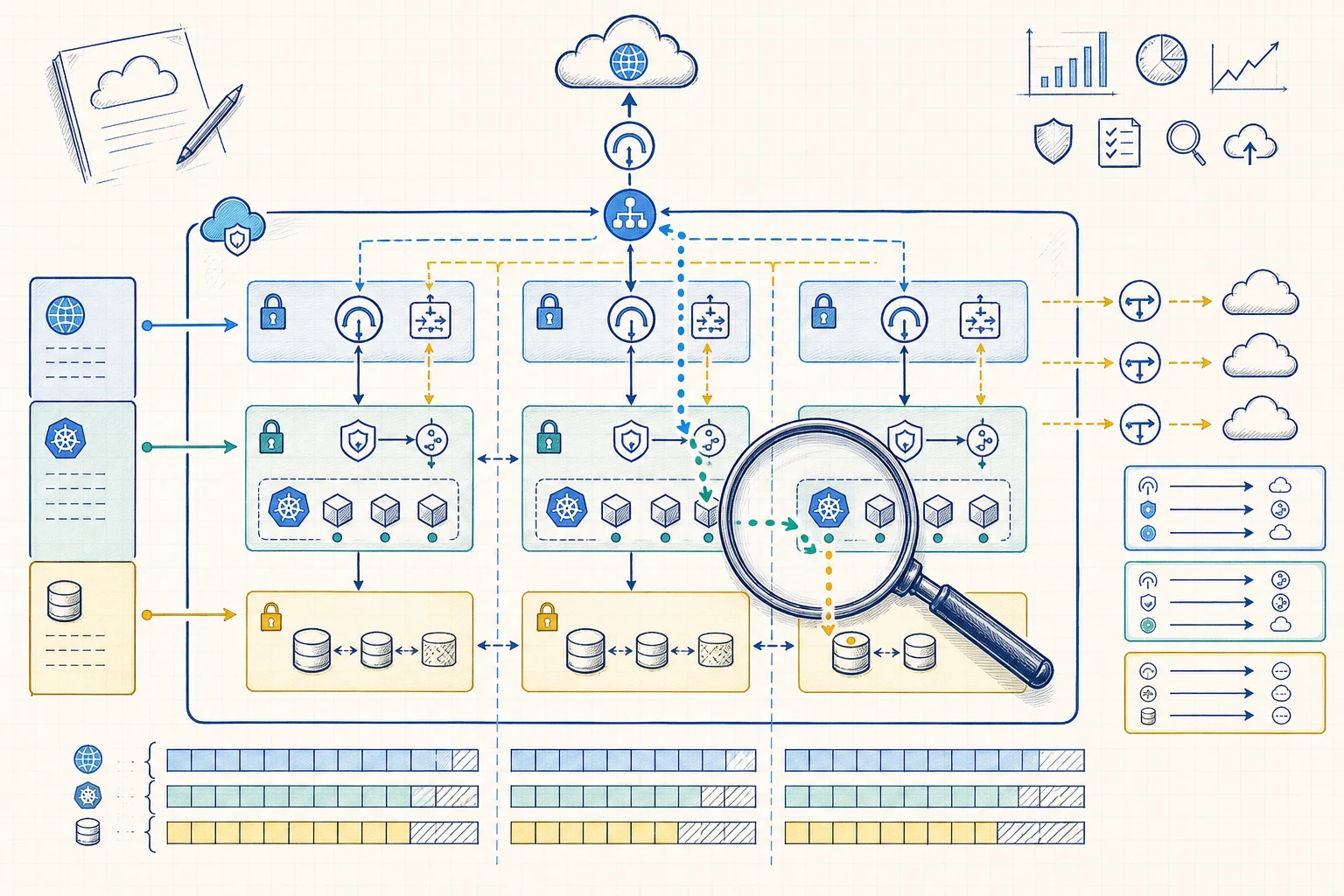
The first network diagram often looks simple: three Availability Zones, public and private subnets, and equal CIDR blocks. Problems appear later when pods run out of IPs, one NAT gateway becomes a dependency, connected networks overlap or a database route is wider than expected.
AWS makes it easy to create a VPC and a few subnets. Changing the address plan becomes slow and risky after EKS clusters, databases, peering, Transit Gateway attachments and VPNs depend on it. We have worked through networks where an early CIDR choice limited the next platform change.
Start by drawing traffic paths and failure behaviour. Decide which workloads need the same routes, which Availability Zones they run in and how they reach the internet, AWS services and other networks. Allocate address space after those decisions.
Address range and route table
A subnet is one address range, in one Availability Zone, using one route table.
Every AWS subnet stays inside one Availability Zone. Its route table decides the next hop for destination traffic. Several subnets can share a route table, while each subnet uses one route table at a time.
The names public, private and isolated describe routing behaviour. They do not secure resources on their own.
Public
The route table has a direct route to an internet gateway. A resource also needs a public address and the right security rules.
Private
The route table has no direct route to an internet gateway. Outbound internet traffic usually uses NAT or a central egress path.
Isolated
The route table has no path outside the VPC unless the team adds a private connection.
Understand the connections first
Draw required connections before choosing CIDR sizes.
For each connection, record the source, destination, protocol, DNS path, trust boundary and expected behaviour during a failure. This often shows that application, data, inspection and management traffic need different route tables.
Inbound
Internet or private traffic entering through load balancers, API endpoints, firewalls or service connections.
Outbound
Package repositories, external APIs, software updates and webhooks that need a controlled exit.
East-west
Application-to-application and application-to-data paths inside or between VPCs.
AWS services
S3, ECR, STS, CloudWatch and other service access through public endpoints or VPC endpoints.
Operations
CI runners, management systems, monitoring, backup and recovery traffic.
Hybrid
On-premises, VPN, Direct Connect and Transit Gateway routes that can create address overlap.
Repeat route roles across zones
Give each active Availability Zone the route paths it needs.
If three private application subnets all use one NAT gateway in one Availability Zone, egress still depends on that zone. Workload placement and network paths both affect availability.
Repeat the required subnet roles in each active zone and document exceptions. Load balancers, EKS, databases and private endpoints have different placement and IP needs, so leave space for the network interfaces they create.
- Map public edge, private application and isolated data roles in each required zone.
- Keep traffic within the same zone when cross-zone routing would add cost or another failure dependency.
- Check that every managed service has enough subnets, zone coverage and free IP addresses.
- Record which subnets are for control-plane interfaces, nodes, pods, load balancers, endpoints and data services.
Leave room for growth
Leave enough IP space for workloads you will add later.
The CIDR plan needs room for growth, more environments and connected networks. Address overlap can block peering, Transit Gateway and VPN connections, which can lead to translation or a new VPC later.
Amazon EKS makes this easy to miss. The VPC CNI can give VPC addresses to pods and keep warm capacity on node interfaces. A subnet sized only for nodes can fill as pod count, load balancers and endpoints grow.
Reserve growth
Keep blocks of free space for new zones, workload types and environments.
Plan each demand
Nodes, pods, endpoints and managed data services grow at different rates.
Track centrally
Use one IP address management model across accounts and regions so allocations follow shared rules.
Three zones with clear routes
Make the route role and exit path visible for every subnet.
The number of subnet groups depends on the platform. Group workloads that need the same routes, repeat required roles across zones and show the path to the internet, private services and connected networks.
Choose CIDRs after the team agrees how traffic enters, leaves, crosses zones and reaches private services.
- 01Record traffic
List inbound, outbound, east-west, AWS-service and hybrid connections.
- 02Choose route groups
Group resources by public, private, isolated, inspection and management behaviour.
- 03Repeat across zones
Create the required route roles in each Availability Zone.
- 04Allocate capacity
Size CIDRs for interfaces, pods, load balancers, endpoints and future growth.
- 05Select exits
Choose zonal NAT, central egress, PrivateLink, gateways and transit paths.
- 06Check reachability
Test routes and rules, then watch real traffic and address use.
Cost and availability share the route table
Choose egress for each route and Availability Zone.
A NAT gateway in each active zone gives each zone its own internet path. Central egress can share inspection and policy, while adding more routes, data-processing cost and a shared dependency. We make this choice clear in the network diagram and cost model.
VPC endpoints can keep supported AWS-service traffic on private paths and reduce NAT use. Each interface endpoint also uses IP addresses and adds DNS, security-group, policy and cost decisions.
Zonal NAT
A gateway and route in each active zone keeps the internet path within that zone.
Central egress
Shared inspection and rules add route complexity and a shared dependency.
Private endpoints
Private service access still needs decisions about placement, DNS and resource policies.
Pods consume network capacity
Treat free subnet IPs as an EKS scaling limit.
An EKS cluster needs subnets in at least two Availability Zones and enough free addresses for cluster interfaces and future operations. Nodes, load balancers and endpoints add more demand.
With the Amazon VPC CNI on EC2 nodes, pods receive VPC addresses. ENI limits, warm address settings, prefix delegation, custom networking and pod count all affect how quickly subnets fill. Monitor free addresses before workloads fail to schedule.
- Use separate subnet capacity for cluster interfaces and changing workloads when the scale needs it.
- Plan for pod IP demand, warm pools, node changes and extra capacity during upgrades.
- Reserve addresses for load balancers and interface endpoints as well as nodes and pods.
- Check subnet tags and discovery rules for the load-balancing controller in use.
Test the path
Check expected and blocked paths, then watch real traffic.
Route tables define possible next hops. Security groups filter traffic at the resource, network ACLs filter traffic at the subnet boundary, and Kubernetes NetworkPolicy can restrict pod traffic when the network setup enforces it. Use each control for its own layer.
We use Reachability Analyzer to check configured paths, VPC Flow Logs to inspect real IP traffic and IPAM to track address history and use. Together they show whether the network behaves like the diagram.
- Test expected allowed and blocked paths as part of infrastructure delivery.
- Collect the Flow Log data needed for investigation and define how long to keep it.
- Alert on free-address limits before subnets block scaling or upgrades.
- Review main route-table associations so new subnets do not receive an unexpected route.
- Keep route, security-group, network-ACL and endpoint-policy changes in infrastructure as code.
The practical outcome
A good subnet plan makes the next platform change easier.
A useful design has enough subnet groups to express the real routes and expected growth. Each subnet role, Availability Zone, exit path and IP budget should connect to a workload need.
When those decisions are clear, teams can add EKS capacity, managed data services, hybrid links and new environments without discovering the network through an outage or an emergency route change.
References and related resources
Read the implementation details.
- Amazon VPC: Subnets for your VPC
- Amazon VPC: Subnet route tables
- Amazon VPC: NAT gateway basics
- Amazon VPC: Access AWS services through PrivateLink
- Amazon VPC IPAM
- Amazon VPC Reachability Analyzer
- Amazon VPC Flow Logs
- Amazon EKS VPC and subnet requirements
- Amazon EKS VPC CNI
- Kubernetes NetworkPolicy
- DevOps Daily: AWS VPC Networking Simulator